
Call Us For Your Battery Needs
800-400-4858
What Is the Best UPS Power Supply in 2026?
Choosing the best UPS power supply in 2026 depends less on a flashy feature list and more on what you need to keep running. A desktop computer, Wi-Fi router, and home server place different demands on a battery backup. A unit that gives a router an hour of runtime may power a gaming PC for only a few minutes. Small details matter.
Start with the equipment’s actual power draw, not just the maximum wattage printed on its label. Check the UPS’s watt rating, battery runtime chart, outlet layout, and warranty. For sensitive computers, confirm whether the model provides pure sine wave output, as some power supplies work better with that waveform. Also consider battery replacement costs and the space available near your desk.
There is no universal winner. Not always. Published runtime estimates can differ from real use, especially when several devices share the same unit. This guide compares UPS options by capacity, runtime, features, and practical value, while noting who each model suits best. It also considers ordinary scenarios: saving work during a brief outage, keeping a router online, or shutting down equipment safely. A brief power cut is easy to plan for; a longer outage is less predictable. That gap deserves attention. The goal is a useful shortlist, not a promise that one UPS will fit every home or office.
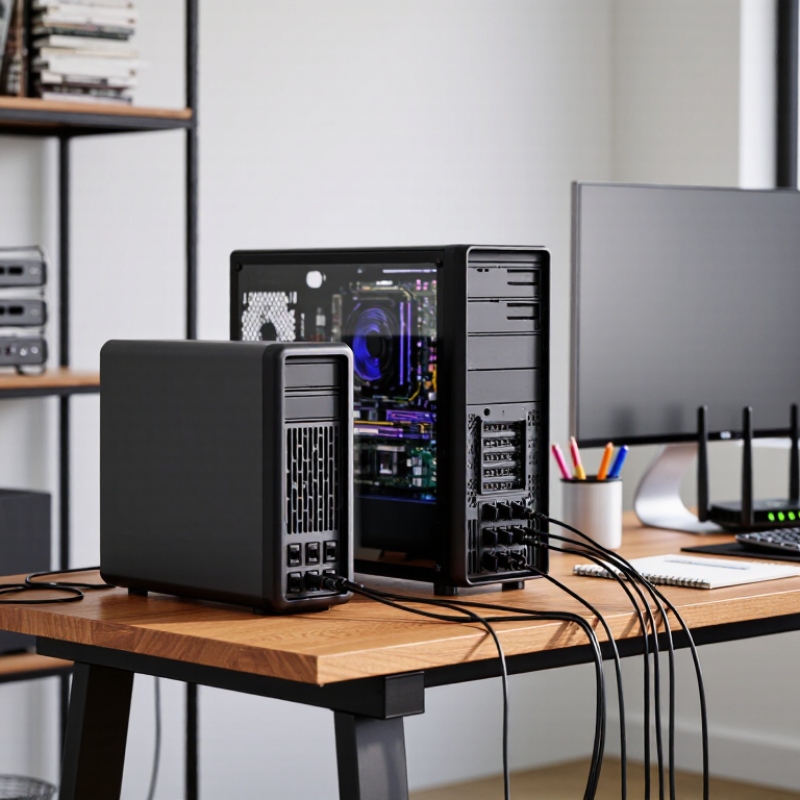
How a UPS Power Supply Protects Connected Equipment
What Is the Best UPS Power Supply in 2026?
A UPS power supply helps protect connected equipment when electrical service becomes unstable or stops. During an outage, its battery can keep a computer, router, or storage device running long enough to save work and shut down safely. That brief window matters. It can also reduce interruptions from short power dips.
Protection varies by model. Some units regulate modest voltage changes, while others mainly provide battery backup and surge protection. A UPS is not a substitute for proper wiring, and it cannot prevent every electrical fault. Check its rated capacity against the equipment’s actual load; a desktop computer and monitor may draw more power than expected. Not magic.
Runtime depends on the load, battery condition, and unit design. A crowded power strip can overload the UPS, so connect only essential equipment and follow the manufacturer’s instructions. I would not treat a runtime estimate on a display as a promise. Estimates can shift as batteries age or workloads change. For a home office, test the setup occasionally, confirm that alarms are audible, and replace a weak battery when indicated. That small check is easy to postpone. It can also reveal whether the equipment stays powered long enough for a safe shutdown.
What Is the Best UPS Power Supply in 2026? — How a UPS Power Supply Protects Connected Equipment
| UPS type | Typical capacity range | Power protection and operation | Transfer to battery | Best suited for | Key trade-off |
|---|---|---|---|---|---|
| Standby (offline) | Approximately 400–1,500 VA | Provides battery backup and surge protection. During normal operation, connected equipment generally receives utility power; the UPS switches to battery when power fails. | Typically about 2–10 milliseconds | Home routers, modems, basic desktop computers, and other lower-power equipment that can tolerate a brief switch. | Usually the simplest and least costly design, but it offers less voltage conditioning than line-interactive or online models. |
| Line-interactive | Approximately 500–3,000 VA | Includes battery backup, surge protection, and automatic voltage regulation (AVR), which can correct some low or high input voltage without using the battery. | Typically about 2–10 milliseconds | Workstations, small office equipment, network devices, and areas with occasional voltage fluctuations. | AVR can reduce unnecessary battery use, but the brief transfer may not suit equipment that requires continuous, tightly controlled power. |
| Online double-conversion | Commonly about 1–10 kVA for smaller systems; larger systems are available | Continuously converts incoming AC power to DC and back to AC. This can provide closely regulated output and isolate connected equipment from many input-power disturbances. | Typically 0 milliseconds for the inverter transfer during a utility outage | Servers, sensitive networking equipment, critical control systems, and installations where power continuity and consistent output are priorities. | Often costs more and may use more energy or generate more heat than standby and line-interactive designs. |
| UPS with pure sine-wave output | Available across multiple capacity ranges | Produces an output waveform closer to utility AC. This can be a suitable choice for equipment whose power supplies specify or work best with sine-wave output. | Depends on the underlying UPS design | Equipment with active power-factor-correction power supplies, selected audio/video systems, and devices whose documentation calls for sine-wave output. | “Pure sine wave” describes the output waveform, not the UPS topology or its transfer time; check both specifications. |
| UPS with extended-runtime battery support | Varies by UPS rating and supported battery configuration | Uses compatible external battery modules, where supported, to increase backup duration. Runtime still depends on the connected load and battery condition. | Depends on the underlying UPS design | Sites that need more time for an orderly shutdown or to maintain selected equipment through longer interruptions. | Additional batteries increase cost, space needs, and maintenance requirements; compatibility must be verified. |
How to choose: Match the UPS output rating to the connected load, allow suitable headroom, and check both watts (W) and volt-amperes (VA). Runtime varies substantially with load, battery age, temperature, and battery configuration. A UPS can provide battery backup and help protect against power interruptions and surges, but it does not replace proper grounding, surge protection for every cable path, or equipment-specific protection.
Related Posts
-

What Is the Best UPS Backup for Global Businesses?
-
China Top UPS Power Supply Manufacturers How to Choose?
-
10 Best UPS Uninterruptible Power Supply Systems for 2026
-
2026 Best UPS Backup Power Supply for Global Buyers?
-
2026 Top UPS Backup Types Which One Should Buyers Choose?
-
How to Choose the Best UPS Backup for Your Business?